
How to Get a CNC Quote Online

Upload your CAD file, configure your part, and receive pricing and manufacturability feedback in minutes.

Parts made as fast as 1 day

check

95.4% On-Time Delivery

check

Instant Online Quoting

check

45+ Materials Available

check

Automatic DFM Feedback

check

Parts as Fast as 1 Day

Step-by-Step Guide

How to Get a CNC Quote Online

1

Create a Free Account

Go to Fictiv.com and sign up — no credit card required. Existing users can log in directly to the quoting dashboard where all active and past orders are visible.

2

Upload Your CAD File

Click New Quote and drag-and-drop your file. Fictiv supports STEP (.stp / .step) and IGES (.igs / .iges) — STEP is preferred for the most accurate pricing. Ensure your geometry is watertight with no open surfaces or duplicate bodies for the cleanest quote. Supported formats: .stp, .step, .igs, .iges, .stl

3

Configure Your Part

Select your material from 45+ options including aluminum, stainless steel, titanium, and engineering plastics. Set your order quantity and choose a surface finish (as-machined, bead blast, anodize, and more). Pricing updates in real time as you adjust each parameter.

4

Review Pricing and DFM Feedback

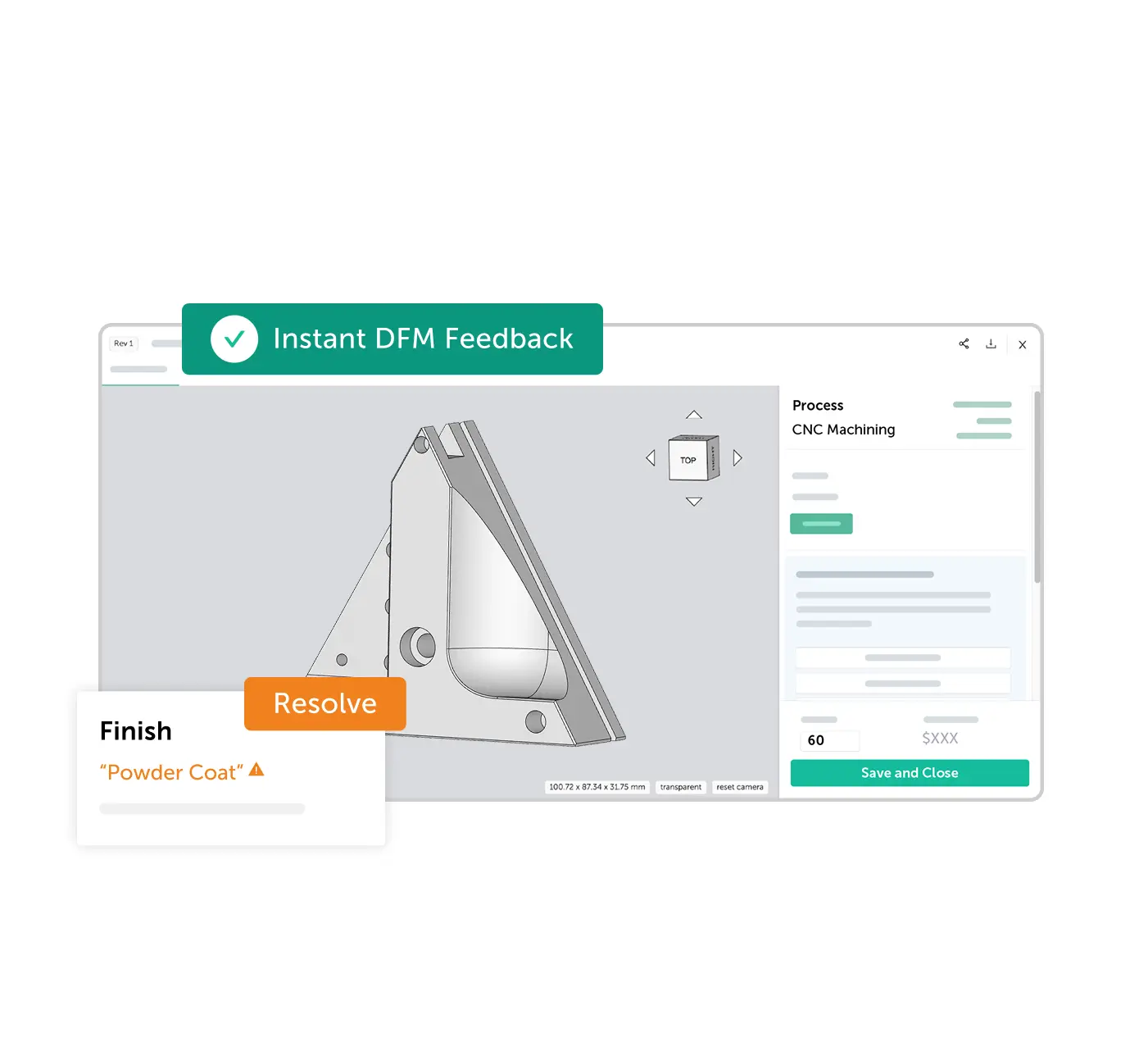
Fictiv instantly returns your price alongside Design for Manufacturability (DFM) insights. Manufacturability flags — such as thin walls, deep pockets, or tolerance conflicts — are surfaced before you commit so you can resolve issues early and avoid costly rework.

5

Choose Lead Time and Order

Compare standard and expedited lead time options side by side. Shorter lead times typically cost more — Fictiv shows you the exact price delta so you can make the right speed-vs-cost tradeoff. When you're satisfied, submit for production with a single click.

Avoid These Pitfalls

Common Mistakes When Getting a CNC Quote Online

A few small errors in your CAD file or quote configuration can delay your project or inflate your cost. Here's what to watch for before you hit submit.

  • Missing or unclear tolerances

    Without callouts, machinists default to standard tolerances. If your part requires tighter specs, add GD&T annotations or a note in the order comments.

  • Over-specifying finishes

    Cosmetic finishes on non-critical surfaces add cost without functional benefit. Only specify the finish where it matters for fit, function, or appearance.

  • Uploading incomplete assemblies

    Multi-body STEP files that include purchased hardware or mating parts can confuse the quoting engine. Upload only the bodies you need machined.

  • Using non-standard materials without context

    Exotic alloys or specialty plastics may not be in the instant-quote database. Add a note or contact our team — we can often source and quote within 24 hours.

How to Get a CNC Quote Online with Fictiv

Pro Tip

Use Fictiv's DFM Report to catch issues before they become problems

Every upload triggers an automated manufacturability analysis. Review the DFM report before approving your quote — it's the fastest way to avoid surprises mid-production.

Try It Free

Why Fictiv

Why Engineers Use Fictiv for CNC Machining Quotes

Instant Pricing

Get real pricing in minutes — not days. No back-and-forth emails, no waiting for a sales rep. Upload your file and see a quote immediately.

DFM Feedback

Identify manufacturability issues early — before they reach the shop floor. Fictiv's automated DFM analysis flags problems and suggests fixes in real time.

Wide Capabilities

45+ materials, tight tolerances down to ±0.001", and a full range of surface finishes. From aluminum prototypes to production steel components — all on one platform.

Production-Ready

Quotes designed for real manufacturing, not estimates. Every order is backed by ISO-certified suppliers with PPAP, FAIR, and full inspection documentation available.

CNC Quote FAQ

How do I get a CNC quote online?

To get a CNC quote online with Fictiv, create a free account at Fictiv.com, upload your CAD file (STEP or IGES), configure your material, quantity, and finish preferences, then receive instant pricing and DFM feedback in minutes.

How long does it take to get a CNC quote?

With Fictiv, you receive an instant CNC machining quote in minutes after uploading your CAD file. For complex parts or custom requests, a detailed RFQ response typically arrives within 1 business day.

What files are needed for CNC machining quotes?

Fictiv supports STEP (.stp, .step), IGES (.igs, .iges), and STL file formats. STEP files are preferred because they carry full geometric data. Clean, watertight geometry without open surfaces or duplicate bodies yields the most accurate quotes.

What affects CNC machining cost?

CNC machining cost is affected by material choice, part complexity and geometry, required tolerances, surface finish specifications, order quantity, and lead time. Fictiv surfaces these trade-offs in real time so you can optimize cost before ordering.

Can I get DFM feedback before ordering?

Yes. Fictiv automatically analyzes your uploaded CAD file and returns Design for Manufacturability (DFM) feedback alongside your quote. Issues such as thin walls, deep pockets, or non-standard tolerances are flagged before you commit to production.

Learn More About CNC Machining

Explore our guides to get the most out of your CNC quote.

Ready to Get Your CNC Quote?

Upload your part and receive pricing in minutes. No credit card required.

95.4% of orders delivered on-time and to-spec